The captured image contains a model-dependent timestamp for the image acquisition time. This timestamp is the buffer timestamp. The timestamp is generated in the camera and specified in nanoseconds. The timestamp starts at 0 at camera startup. Use TimestampReset to reset the camera timestamp.
For the following models, the timestamp is always identical to the time of the "ReadOutStart":
•USB 3 uEye+ CP Rev. 2/Rev. 2.2
•USB 3 uEye+ LE Rev. 1/Rev. 1.2
•USB 3 uEye+ SE Rev. 1/Rev. 1.2
•Gige uEye+ CP Rev. 2/Rev. 2.2
•GigE uEye+ FA Rev. 1/Rev. 1.2
•GigE uEye+ LE Rev. 2
•GigE uEye+ SE Rev. 4/Rev. 4.2
•GigE uEye+ Warp10

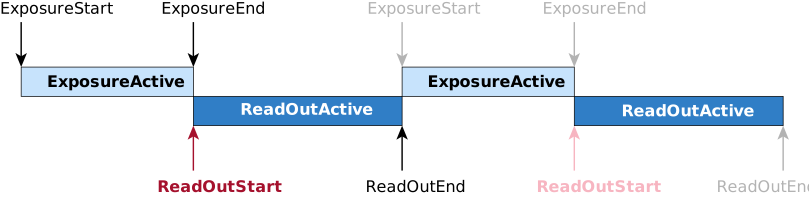
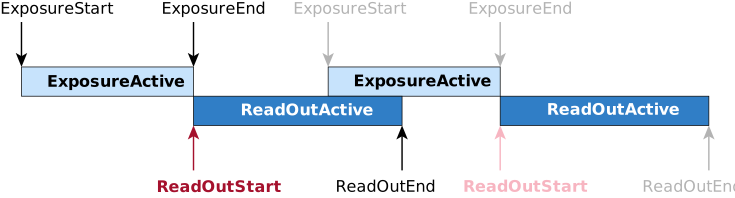
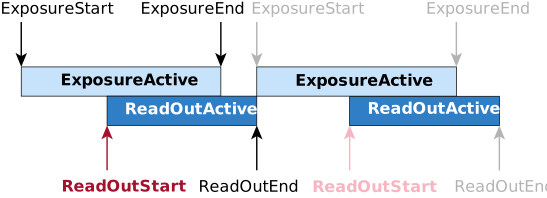
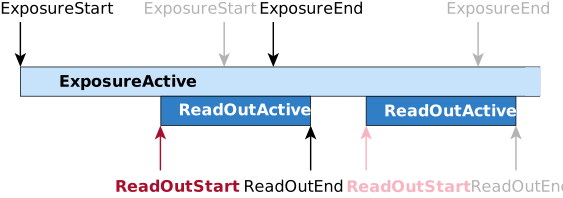
Special case: USB 3 uEye+ XCP Rev. 1.2 / USB 3 uEye+ XLE Rev. 1.2 / USB 3 uEye+ XLS Rev. 1.2
For the models of these camera families, the timing of the timestamp varies depending on the operating mode. In general, the timestamp is less accurate on these models and is therefore not suitable for precise time measurements. However, the timestamp can be used, for example, as a reference for the sequence of images.
•In freerun mode with "ExposureStart": The timestamp is the time when the camera is internally ready to capture the next image. In freerun mode, this results in a delay between the timestamp and "ExposureStart". The delay depends on the operating mode and image settings.
•In trigger mode with "ExposureStart": The timestamp is the time when the camera is internally ready to capture the next image. In the "ExposureStart" trigger mode, as described above, the timestamp is solely intended to determine the sequence of images.
•In trigger mode with "ReadOutStart": The timestamp is the time when the trigger signal arrives.
Notes on the timestamp in the chunks
•ChunkTimestamp: Returns the timestamp of the image included in the payload. The timestamp represents the time of the FrameStart (ExposureStart) internal event.
•ChunkExposureTriggerTimestamp: Returns the timestamp of the “ExposureTrigger” of the image included in the payload. The timestamp represents the time of the "ExposureStart" trigger signal. ChunkExposureTriggerTimestamp returns 0 when the "ExposureStart" trigger is disabled.
•ChunkLatchTriggerSource: Latches the chunk value with the selected source signal, i.e. defines at which time the selected chunk data will be captured.
For more information about chunks, see the Enabling meta data (chunks) section.
Special case uEye Transport Layer: USB 3 and GigE uEye cameras (UI models)
•In trigger mode, the timestamp indicates the time when the trigger signal (hardware or software trigger) is received by the camera.
•In freerun mode, the timestamp indicates the time when the sensor starts to read out image data. A rolling shutter sensor reads out image data after the first row has been exposed. A global shutter sensor reads out image data after all rows have been exposed.
